GIFit! - Make GIFs from YouTube videos
GIFit! is a free browser add-on for Chrome that allows users to easily create GIFs from YouTube videos. With the recent update, it is now compatible with the latest YouTube interface.
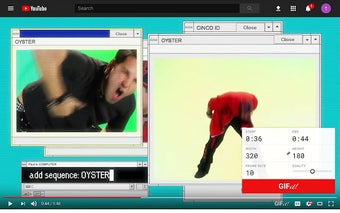
To use GIFit!, simply install the add-on and go to any video on YouTube. You will find the GIFit! icon in the toolbar, located next to CC, watch later, and settings. Click on the icon and set the start time, end time, and other configuration options for your GIF. Then, click the big red GIFit! button and wait a few seconds for your GIF to be generated. Once it's ready, you can save it by clicking the "Save GIF" button.
Please note that GIFit! only works in Chrome's HTML5 mode, which is usually the default mode. It does not work with videos that use the Flash player. Additionally, the GIFs created by GIFit! can be quite large, but future versions of the add-on are expected to produce smaller GIFs.
Overall, GIFit! is a convenient tool for capturing short clips from YouTube videos and turning them into GIFs. Give it a try and unleash your creativity!